This drifted a little off track, but while I was migrating my home mail server, I also configured Emacs so I could read and write email there.
Test Environment
Windows 10 Pro version 20H2 (OS build 19042.868)
64-bit GNU Emacs 27.1 official build
"GNU Emacs 27.1 (build 1, x86_64-w64-mingw32) of 2020-08-22"
Mew 6.8 Windows
Overview
I use Mew as the mailer in Emacs. I have not used anything else. I think there was also something called Wanderlust. These days, I almost never read or write email in Emacs anymore. Still, back when email was the main communication tool, being able to write email in Emacs felt deeply impressive.
Procedure
Install the Mew package from MELPA.
M-x package-install
mew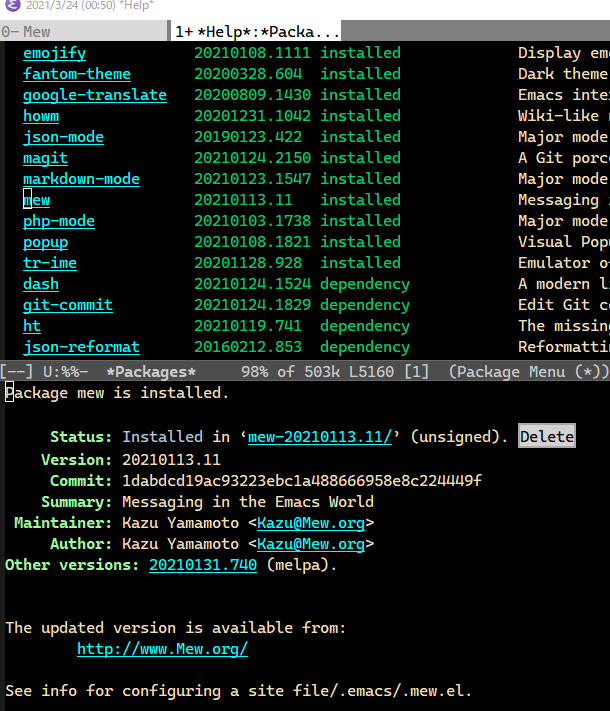
Install Mew-Related Binaries
With MELPA, the required binaries are not installed, apparently, so download and extract "Windows binaries" from Mew's official site.
Extract cmew.exe, mewencode.exe, mewl.exe, smew.exe from mew-6.8\bin to a location on PATH. Anywhere on PATH should be fine. I put them in %HOME%/bin.
Install Stunnel
Download and install it from the official stunnel site. stunnel-5.58-win64-installer.exe
If you use the installer, it installs to C:\Program Files (x86)\stunnel\bin by default, so add that to PATH too.
Configuration
Write the settings in .emacs and .mew.
.emacs Configuration Example
;; 下記を追記します
;; Mew
(autoload 'mew "mew" nil t)
(autoload 'mew-send "mew" nil t)
.mew Configuration Example
I configured it so I could read and write mail with my home mail server and Gmail.
;; Password Cache
(setq mew-use-cached-passwd t)
(setq mew-passwd-timer-unit 120)
;; Master Password
;;(setq mew-use-master-passwd t)
(setq mew-use-master-passwd nil)
;; BIFF
(setq mew-use-biff t)
(setq mew-biff-interval 10)
;; global configurations
(setq mew-imap-header-only nil)
(setq mew-ask-subject t)
;; Download site: https://www.stunnel.org/downloads.html
(setq mew-prog-ssl “tstunnel”)
;; メールアカウントの設定
(setq mew-config-alist
‘(
(default
(“biff-interval” . 10)
(“name”        . “Washi Hage”)
(“user”        . “washi”)
(“from”        . “Washi ha Hage <washiha@hage.dayo>”)
(“mail-domain” . “hage.dayo”)
(“smtp-server” . “hage.dayo”)
(“smtp-auth”   . t)
(“smtp-user”   . “washiha@hage.dayo”)
(“smtp-ssl”   . t)
(“smtp-port” . “587”)
(“smtp-ssl-port” . “587”)
(“proto”       . “%”)
(“imap-trash-folder” . “%Trash”)
(“fcc”         . “%Sent”)
(“imap-user”   . “washiha@hage.dayo”)
(“imap-server” . “hage.dayo”)
(“imap-auth”   . t)
(“imap-ssl”    . t)
(“imap-ssl-port” . “993”)
(“signature-file”  . “.signature”))
(“gmail” ;; IMAP for Gmail
(“use-biff” . t)
(“use-biff-bell” . t)
(“biff-interval” . 10)
(“proto”       . “%”)
(“name”        . “Washi Hage”)
(“user”        . “washi”)
(“signature-file”  . “.signature”)
(“mail-domain” . “gmail.com”)
(“smtp-user”   . “xxxxxxxxxx@gmail.com”)
(“smtp-server” . “smtp.gmail.com”)
(“smtp-auth”   . t)
(“smtp-ssl”   . t)
(“smtp-ssl-port” . “465”)
(“imap-user”   . “xxxxxxxxxx@gmail.com”)
(“imap-server” . “imap.gmail.com”)
(“imap-auth”   . t)
(“imap-ssl”    . t)
(“imap-ssl-port” . “993”)
(“fcc”         . “%[Gmail]/送信済みメール”)
(“imap-trash-folder” . “%[Gmail]/ゴミ箱”))
))
I actually wanted to set (setq mew-use-master-passwd t), but I did not understand how to use PGP for Windows and gave up. I wish I could do something about just this part.
Try Using It
Start it with M-x Mew. At first, you need to use C-u Z to fetch the IMAP folder list.
For how to operate it, I think it is best to look at the manual or search online.
Personal Memo
Move to the folder you want to delete with g %gomifolder. In that folder, type Rd. mew-summary-delete-folder is called and the folder is deleted.
Bonus
I wondered whether X-Face could still be used, so these are notes from trying it.
Configuration Notes
The official site seems to be gone, so I decided to use the file from the Debian package site.
Place x-face.el somewhere on the load-path, such as .emacs.d/site-lisp.
(add-to-list 'load-path "~/.emacs.d/site-lisp")
Download the Windows binaries for compface/netpbm, extract them, and put them somewhere on PATH.
- http://gnuwin32.sourceforge.net/packages/compface.htm
- http://gnuwin32.sourceforge.net/packages/netpbm.htm
Create an X-Face
Use Windows Paint to make a rough 48x48 monochrome bitmap image.
Use NetPbm for Windows to convert it to xbm.
$ bmptoppm xface_washi.bmp > xface_washi.ppm
$ ppmtopgm xface_washi.ppm > xface_washi.pgm
$ pgmtopbm xface_washi.pgm > xface_washi.pbm
$ pbmtoxbm xface_washi.pbm > xface_washi.xbm
Encode the XBM file as X-Face.
M-x load-library
Load library: x-face
M-x x-face-encode
[Encode] xbm file: ~/xface_washi.xbm
X-Face: H\uJhX\GT|fdCNW5Ou)KW\~/Y#SS;5g^[QuJc.tiK2GY]|PC8qmuh9tGc:BhJyblF&%~Jj/
 ;\5fT&Y{^vu!Emq7P}V;1Xu$6N')xb@b5?^BnU-9u\~D:Yl,61<h_JP#<Y@7GrjClhl6U&nY=/a3vE
 _Umn\Zk-=<(7yZ.l.)%9GKefMq'\4w"Q,_bG$e!_^@=CZqLG?@r,9
X-Face: H\uJhX\GT|fdCNW5Ou)KW\~/Y#SS;5g^[QuJc.tiK2GY]|PC8qmuh9tGc:BhJyblF&%~Jj/
 ;\5fT&Y{^vu!Emq7P}V;1Xu$6N')xb@b5?^BnU-9u\~D:Yl,61<h_JP#<Y@7GrjClhl6U&nY=/a3vE
 _Umn\Zk-=<(7yZ.l.)%9GKefMq'\4w"Q,_bG$e!_^@=CZqLG?@r,9
If you save the encoded result with X-Face: removed as ~/.xface, Mew loads it automatically, apparently.
It worked!
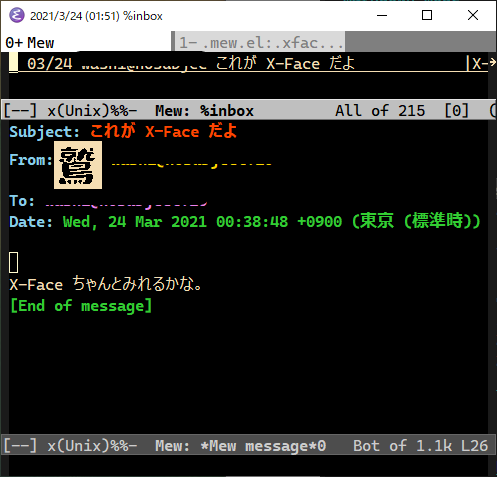

It is simply nostalgic.