When using Emacs, it feels wrong if the fonts are not configured.
I do not really understand the proper way to configure them, but I searched around and tried settings that suit me reasonably well.
Test Environment
Windows 10 Pro version 20H2 (OS build 19042.746)
64-bit GNU Emacs 27.1 official build
"GNU Emacs 27.1 (build 1, x86_64-w64-mingw32) of 2020-08-22"
Overview
The default state is hard to read, so I will start by configuring only the basic fonts. That said, I personally do not understand Emacs font configuration very well.
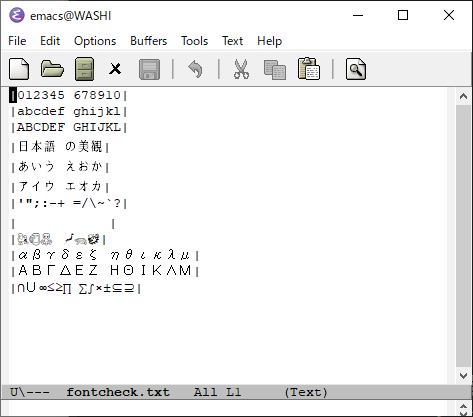
The image below is the initial state with no configuration.
Procedure
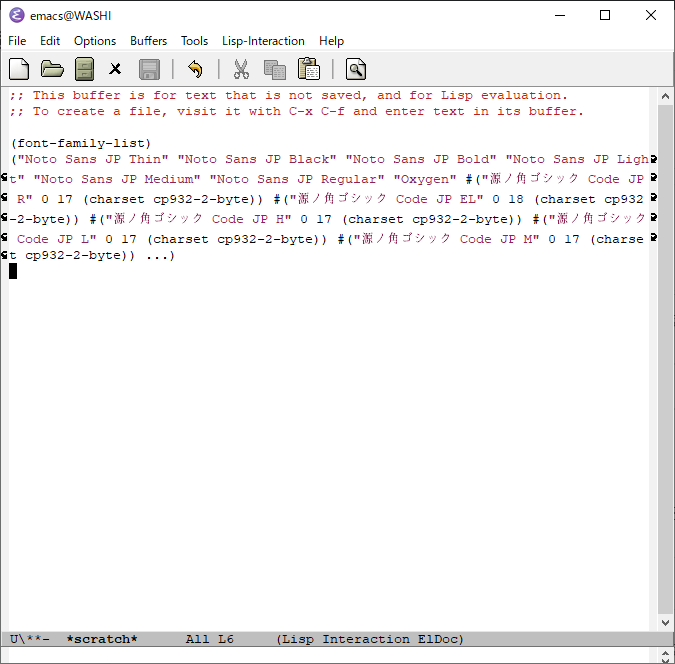
You can get a list of fonts available in Emacs by evaluating (font-family-list) in the Scratch buffer. Choose the font you want to use from that list.
These days I no longer care much about perfectly aligned monospaced display, so I chose fonts casually.
Once you decide on the fonts you want to use, all that remains is adding the settings to .emacs.
In the example below, I specify MeiryoKe_UIGothic for Japanese, Cascadia Code for ASCII, and Segoe UI Emoji for Unicode. If you want a monospaced look, I think using something like MeiryoKe_Gothic would be good.
The following article was helpful for adjusting font width. Thank you.
https://qiita.com/kaz-yos/items/0f23d53256c2a3bd6b8d
.emacs Configuration Example
Here is a configuration example. (Adjust the parts marked with stars to your preference.)
;; MELPAの設定
(customize-set-variable 'package-archives
                        `(,@package-archives
                          ("melpa" . "https://melpa.org/packages/")))
;;(add-to-list ‘package-archives (cons “melpa” “https://melpa.org/packages/") t)
;; ローカルのLISP置き場
(add-to-list ’load-path “~/.emacs.d/site-lisp”)
;; tr-imeのDLLを自動でダウンロードしてくれる
(tr-ime-advanced-install)
(setq default-input-method “W32-IME”)
;; IM のデフォルトを IME に設定
(setq default-input-method “W32-IME”)
;; IME のモードライン表示設定
(setq-default w32-ime-mode-line-state-indicator “[–]”)
(setq w32-ime-mode-line-state-indicator-list ‘(”[–]" “[あ]” “[–]”))
;; IME 初期化
(w32-ime-initialize)
;; IME 制御(yes/no などの入力の時に IME を off にする)
(wrap-function-to-control-ime ‘universal-argument t nil)
(wrap-function-to-control-ime ‘read-string nil nil)
(wrap-function-to-control-ime ‘read-char nil nil)
(wrap-function-to-control-ime ‘read-from-minibuffer nil nil)
(wrap-function-to-control-ime ‘y-or-n-p nil nil)
(wrap-function-to-control-ime ‘yes-or-no-p nil nil)
(wrap-function-to-control-ime ‘map-y-or-n-p nil nil)
;; テーマのロード
(load-theme ‘wheatgrass t)
(defvar user/standard-fontset
(create-fontset-from-fontset-spec standard-fontset-spec)
“Standard fontset for user.”)
(defvar user/font-size 16
“Default font size in px.”)
(defvar user/cjk-font “MeiryoKe_UIGothic” ;; ← ★日本語フォントの設定
“Default font for CJK characters.”)
;; 日本語とアルファベットフォントのサイズバランスが悪い場合はここで調整する
;; 参考: https://qiita.com/kaz-yos/items/0f23d53256c2a3bd6b8d
(defvar user/cjk-font-scale
‘((14 . 1.0)
(15 . 1.0)
(16 . 1.1)
(17 . 1.1)
(18 . 1.0))
“Scaling factor to use for cjk font of given size.”)
;; Specify scaling factor for CJK font.
(setq face-font-rescale-alist
(list (cons user/cjk-font
(cdr (assoc user/font-size user/cjk-font-scale)))))
(defvar user/latin-font “Cascadia Code” ;; ← ★アスキーフォントの設定
“Default font for Latin characters.”)
(defvar user/unicode-font “Noto Emoji” ;; ← ★絵文字フォントの設定
“Default font for Unicode characters, including emojis.”)
(defun user/set-font ()
“Set Unicode, Latin and CJK font for user/standard-fontset.”
;; Unicode font.
(set-fontset-font user/standard-fontset ‘unicode
(font-spec :family user/unicode-font) nil ‘prepend)
;; Specify scaling factor for Unicode font.
(defvar user/unicode-font-scale
‘((14 . 1.0)
(15 . 1.0)
(16 . 1.0)
(17 . 1.0)
(18 . 1.0))
“Scaling factor to use for Unicode font of given size.”)
(add-to-list ‘face-font-rescale-alist (cons ‘user/font-size user/unicode-font-scale))
;; Latin font.
;; Only specify size here to allow text-scale-adjust work on other fonts.
(set-fontset-font user/standard-fontset ’latin
(font-spec :family user/latin-font :size user/font-size) nil ‘prepend)
;; CJK font.
(dolist (charset ‘(kana han cjk-misc hangul kanbun bopomofo))
(set-fontset-font user/standard-fontset charset
(font-spec :family user/cjk-font) nil ‘prepend))
;; Special settings for certain CJK puncuation marks.
;; These are full-width characters but by default uses half-width glyphs.
(dolist (charset ‘((#x2018 . #x2019)    ;; Curly single quotes “‘’”
(#x201c . #x201d)))  ;; Curly double quotes ““””
(set-fontset-font user/standard-fontset charset
(font-spec :family user/cjk-font) nil ‘prepend)))
;; Apply changes.
(user/set-font)
;; Ensure user/standard-fontset gets used for new frames.
(add-to-list ‘default-frame-alist (cons ‘font user/standard-fontset))
(add-to-list ‘initial-frame-alist (cons ‘font user/standard-fontset))
;; IMEの変換のときのフォント
(modify-all-frames-parameters ‘((ime-font . “MeiryoKe_UIGothic-12”))) ;; ← ★日本語変換のときのフォント設定
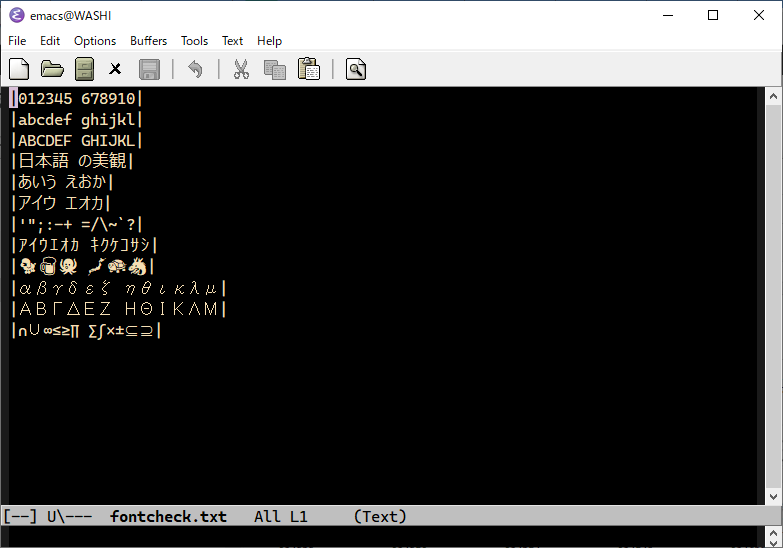
I tried using a dark-background theme, so Noto Emoji seems better than Segoe UI Emoji for emoji. Because the font is not monospaced, Japanese and ASCII characters look uneven compared to each other, but I ended up with settings I like.
Reference Sites
https://www.shimmy1996.com/en/posts/2018-06-24-fun-with-fonts-in-emacs/
https://qiita.com/kaz-yos/items/0f23d53256c2a3bd6b8d

I wish Windows would display Emacs with decent fonts from the start, or make font configuration easier.