I canceled WiMAX 2+ because using an ahamo SIM seemed cheaper, so I tried whether an ahamo SIM could be used with Speed Wi-Fi HOME L02 / NEXT W06.
Background
When there is less than a year left before the contract renewal, WiMAX 2+ recommends another three-year contract renewal under the premise of changing the Wi-Fi router model and making the device fee free.
However, with mobile carriers competing to lower data communication prices, I do not feel eager to renew for three years just because the monthly fee becomes a little cheaper and I can get a new device.
The WiMAX I use was originally installed for internet access at my parents' home, and the monthly data usage is around 20GB at most. If so, ahamo might be enough, so I tried whether HOME L02 could be used with a docomo SIM.
| Giga Unlimited | ahamo | |
| Monthly fee | 4,268 yen (tax included) | 2,970 yen (tax included) |
| LTE data volume | 7GB/month | 20GB/month |
| Unlimited connection | WiMAX 2+ | Up to 1Mbps (when speed is reduced) |
Even after exceeding 20GB, ahamo can be used at up to 1Mbps, so it provides speed equal to or sometimes better than a WiMAX 2+ connection, and the monthly fee is cheaper. Even paying a cancellation fee to switch did not seem too painful.
Test Environment
- Speed Wi-Fi HOME L02 (UQ WiMAX version), the one used with GMO Tokutoku BB's au SIM.
- ahamo SIM, the one being swapped in this time.
I bought the HOME L02 on Mercari about a year ago and used it as Wi-Fi for my parents' home.
HOME L02 is also sold on Amazon. New units are expensive, but used ones should be cheap.
Configuration
There is nothing particularly difficult, so I will just write the rough procedure.
To state the conclusion first, HOME L02 is SIM-free, so it works normally with a docomo SIM if you replace the SIM, configure the APN, and switch to High Speed Plus mode.
Here is how to do it.
- First, remove the au SIM from the HOME L02 and replace it with the docomo SIM. You only need to swap the SIM at the bottom of the device.
- After replacing it, turn on the HOME L02. This alone will not connect it to the internet.
- Install the HUAWEI HiLink app on your smartphone, connect to the HOME L02 Wi-Fi, and log in. The initial password and other details are written on the bottom of the HOME L02. (Even without HUAWEI HiLink, you may be able to configure it the same way by logging in to the HOME L02 from a browser.)
- Add "spmode.ne.jp" as the APN. You do not need to enter a username or password.
- Switch to High Speed Plus mode.
That is it. The HOME L02 can now be used the same way as when it was used with WiMAX. If the settings screen shows a 7GB limit, you may need to change those values too.
Update: Use a docomo SIM (ahamo) with Speed Wi-Fi NEXT W06
I also tried it with Speed Wi-Fi NEXT W06, and a docomo SIM worked with similar settings.
- Swap the W06 SIM and restart it.
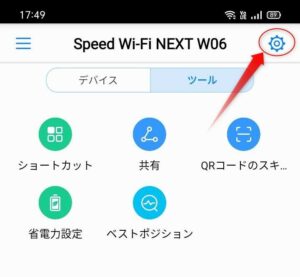
- Connect to the W06 from the HUAWEI HiLink app on your smartphone. Once connected, press the settings button in the upper right.
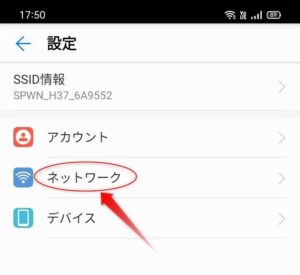
- Select Network. (If it is grayed out, log in from Account first.)
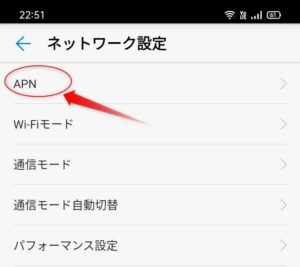
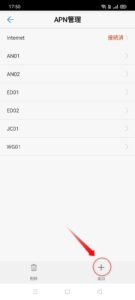
- Add the APN. Press the Add button, and when the APN settings screen appears, enter "docomo" for the name and "spmode.ne.jp" for APN, then tap the check mark in the upper right to add it. Leave the username and password blank. This alone will not connect.
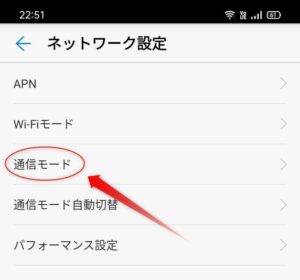
- In Network Settings, tap "Communication Mode" and switch to "High Speed Plus Area". You can also switch it by operating the W06 device itself.
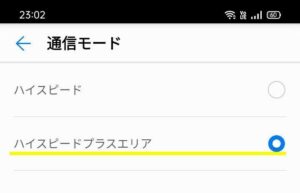
- When it connects to the docomo network, the W06 antenna display changes from spinning to connected.
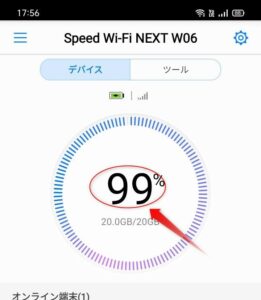
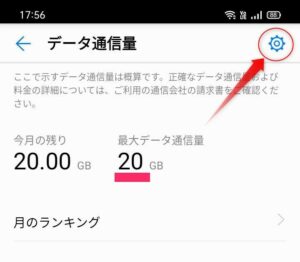
- The usage gauge is set to 7GB, so tap the gauge and change it to 20GB.
The communication speed seems slower than when using an iPhone. Still, it is usable.
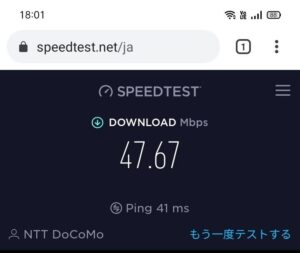

From September onward, d CARD GOLD users apparently get an extra 5GB, so tethering from my own smartphone alone might be enough.
Update, June 2021:
It has been about two months since I changed the internet environment at my parents' home to Speed Wi-Fi HOME L02 + ahamo SIM, and canceling WiMAX was the right decision. There was the downside of paying a cancellation fee, but the monthly cost ended up lower, the connection is stable, and the speed improved, so I am very satisfied. If you want to share it with family or carry it outside, the W06 is better. This can also be bought on Mercari for around the 1,000-yen range.
*Personal opinion.
Related: Can a mineo SIM Be Used in a WiMAX+ Wi-Fi Router, the Speed Wi-Fi NEXT W06?