As the title says, NURO Hikari lets me open ports without particular restrictions, so I stopped PPPoE on the Raspberry Pi and exposed it externally using the ONU settings.
Overview
The flow is roughly like this.
- Remove the PPPoE settings and change the network settings.
- Configure the DMZ on the ONU (SGP200W).
- Shut down the Raspberry Pi, then change the connection from the docomo Hikari TA to the NURO Hikari ONU.
- Start the Raspberry Pi.
The target Raspberry Pi is used for the following purpose.
[Raspberry Pi 4] Build a Mail Server (Postfix + Dovecot) with Docker
(*Actually, with the settings above, I had been running it without noticing that unintended ports were open.)
Test Environment
Raspberry Pi 4 (RAM 8GB)
Ubuntu 20.10 (arm64)
NURO Hikari ONU SGP200W
Remove PPPoE Settings and Change Network Settings
Change the 50-cloud-init.yaml settings. I set the static IP to 192.168.1.40 and point gateway4 and DNS (nameservers) to the ONU.
# vi /etc/netplan/50-cloud-init.yaml
network:
    ethernets:
        eth0:
            dhcp4: no
            dhcp6: no
            addresses:
            - 192.168.1.40/24
            gateway4: 192.168.1.1
            nameservers:
                addresses:
                - 192.168.1.1
                - 8.8.8.8
            match:
                driver: bcmgenet smsc95xx lan78xx
            optional: true
            set-name: eth0
    version: 2
/etc/network/interfaces contains PPPoE settings, so comment them out or delete them.
# vi /etc/network/interfaces
# interfaces(5) file used by ifup(8) and ifdown(8)
# Include files from /etc/network/interfaces.d:
source-directory /etc/network/interfaces.d
auto dsl-provider
iface dsl-provider inet ppp
iface inet ppp
pre-up /bin/ip link set eth0 up # line maintained by pppoeconf
provider dsl-provider
auto eth0
iface eth0 inet manual
Configure DMZ on the ONU (SGP200W)
Log in to the NURO Hikari ONU admin screen. The ONU's default IP address is 192.168.1.1.
Access http://192.168.1.1/ from a browser, then log in with account admin and the Wi-Fi initial password written on the ONU, the value written as "Key(WPA)".
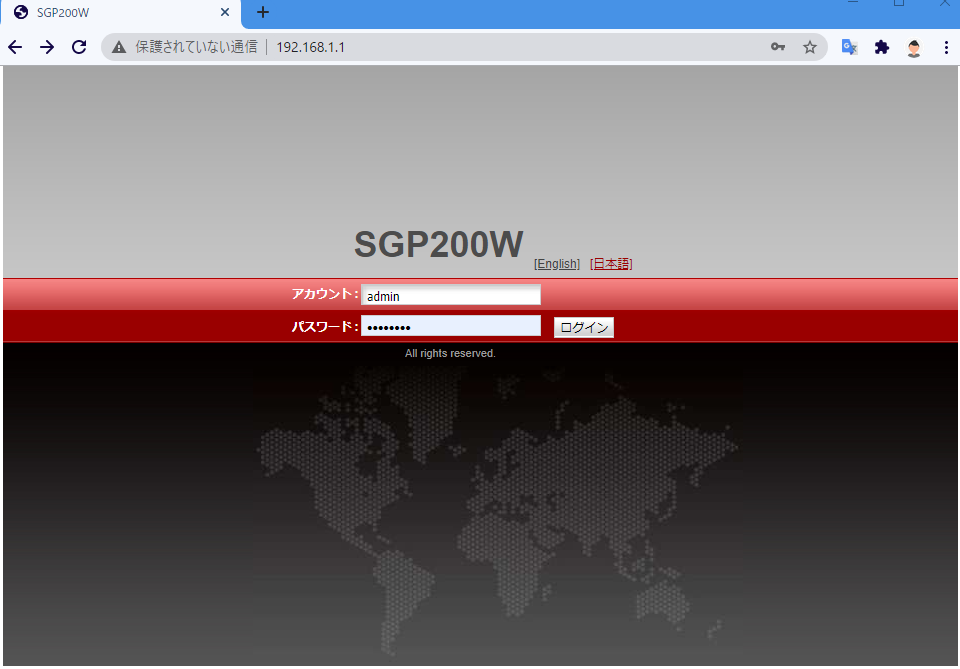
On first login, a password change screen appears. Handle that as appropriate, then
open "Forwarding Rules" -> "Port Mapping Settings".
Add mappings for each port you want to open.
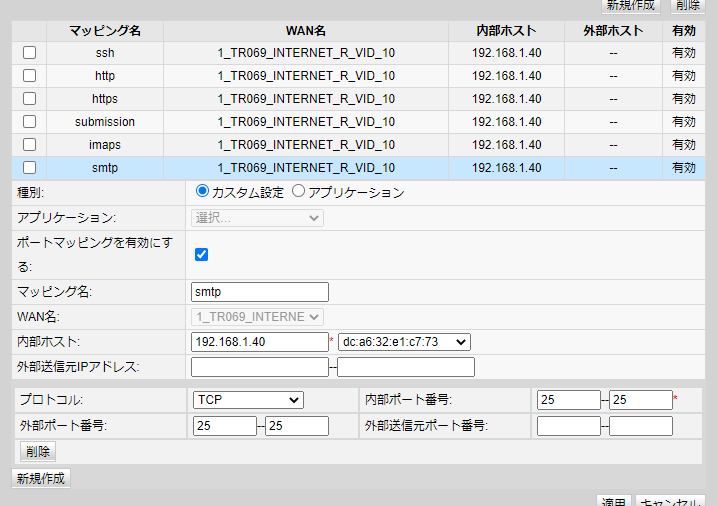
After pressing Apply, the settings take effect immediately and the ports are opened.
At first I tried using DMZ instead of port mapping, but I discovered that unintended Docker container ports were open, so I stopped using DMZ and configured port mapping instead. There are apparently ways to handle this on the Docker side too, but keeping that in mind every time is a hassle.
Reference: A story about the security of a public host being wide open
https://www.ryotosaito.com/blog/?p=492
Next, add a "Static DNS setting" so that the Raspberry Pi can also be accessed by domain name (nosubject.io) from inside the LAN.
Open "Network Application" -> "DNS Settings".
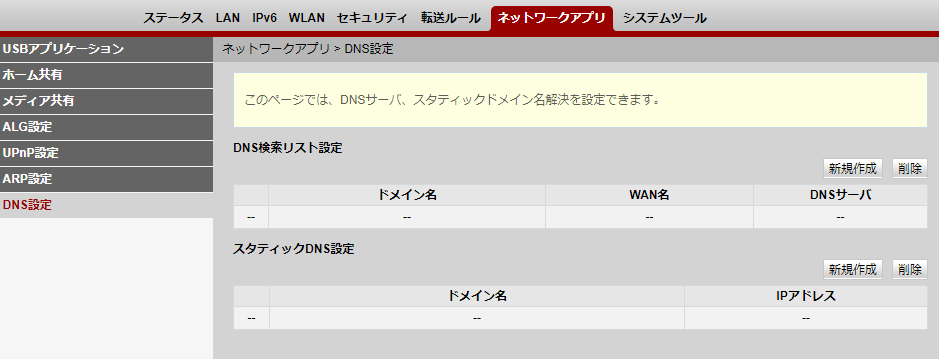
Click the "Create New" button.
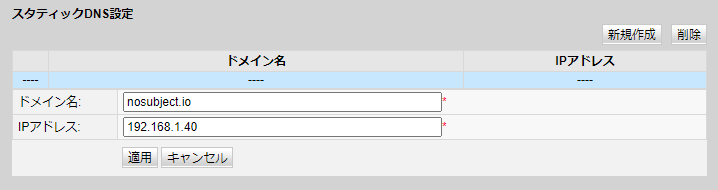
Enter the domain name tied to the global IP address and the Raspberry Pi IP address, then click the "Apply" button.
If you do not do this, you cannot access the global IP address from inside the LAN, meaning you cannot access the Raspberry Pi by domain name, which is very inconvenient. With just this setting, you no longer need to write entries in the hosts file or handle it with an internal DNS, so it is convenient.
Reference: NURO ONU device manuals
https://www.nuro.jp/device.html
Switch the Connection
Shut down the Raspberry Pi and connect it to a LAN port on the NURO Hikari ONU.
Turn it on, and once dynamic DNS has propagated, you are done. With nslookup from the LAN, the target domain address should resolve to 192.168.1.40, while from outside it should resolve to the global IP.
Use something like the following to check that only the intended ports are open.
https://pentest-tools.com/network-vulnerability-scanning/tcp-port-scanner-online-nmap#

I do not think the docomo Hikari TA had a "Static DNS setting", so using it this time was quietly convenient. From now on, if I publish something, I only need to do the "Port Mapping Settings".
Bonus
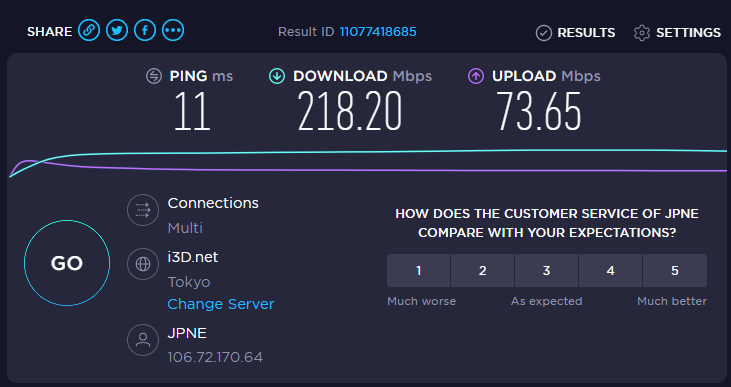
docomo Hikari 1G
NURO Hikari 2G
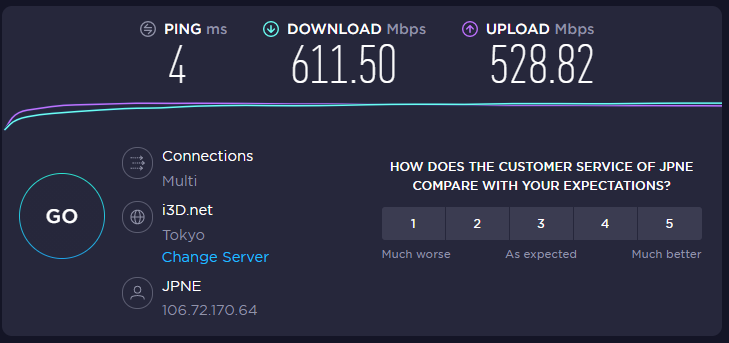
I was not dissatisfied with the speed of docomo Hikari, but after switching to NURO Hikari, it became noticeably faster. Good ending.