This is a memo for enabling hardware encoding in EPGStation running on a Raspberry Pi. It continues from the previous article, [Raspberry Pi 4] Four-Channel Terrestrial Digital Recording Server on Ubuntu with PX-Q1UD. Some parts still do not work perfectly, but the GPU appears to be usable, and it is mostly operational now.
This is amateur work, so follow it at your own risk if you use it as a reference.
Test Environment
- Raspberry Pi 4 8GB
- Terrestrial digital tuner PX-Q1UD / *The procedure is the same for PX-S1UD V2.0.
- Raspberry Pi OS 64-bit & Docker / The procedure should be the same on Ubuntu too if Docker is installed, probably.
This time too, I will use docker-mirakurun-epgstation.
Prepare the Hardware
Connect the tuner, B-CAS card reader, and SSD. It gets quite hot, so I attached heatsinks to the aluminum case.

Install the Driver
Install the tuner driver.
# PX-Q1UD/PX-S1UD V2.0 の場合は下記が必要。
$ sudo apt-get install -y unzip
$ wget http://plex-net.co.jp/plex/px-s1ud/PX-S1UD_driver_Ver.1.0.1.zip
$ unzip PX-S1UD_driver_Ver.1.0.1.zip
$ sudo cp PX-S1UD_driver_Ver.1.0.1/x86/i386/isdbt_rio.inp /lib/firmware/
$ rm -rf PX-S1UD_driver_Ver.1.0.1.zip PX-S1UD_driver_Ver.1.0.1
コンテナからもデバイスにアクセスできるようにパーミッションを変更する
$ echo ‘SUBSYSTEM==“vchiq”,GROUP=“video”,MODE=“0666”’ | sudo tee /etc/udev/rules.d/10-vchiq-permissions.rules
I wrote the same thing in a gist, so if you want to reuse it as-is, run the following command.
$ curl -sf https://gist.githubusercontent.com/usurageha/afb8b4a20480acb6d75d0dcee88c9d3e/raw/d252adadd15f19dd3fbf36f815c5586bede7d973/PXQ1UD_driver_install.sh | sudo sh -sSince encoding is done with the GPU, it is also good to increase the GPU memory size.
[Raspberry Pi 4] Increase the Memory Allocated to the GPU
Reboot once here.
$ sudo shutdown -h nowWith reboot, devices are often not recognized after startup, so I fully power off once, including the tuner, and then turn it back on. Especially with PX-Q1UD, the tuner often becomes unstable unless the external power is also disconnected.
Update 2022/01/08: The reboot problem seems to happen because even when the Raspberry Pi is powered off, the tuner supplies power to each USB port. In short, rebooting the Raspberry Pi does not reset the device. So I used a USB-DC power supply cable and powered the tuner from the Raspberry Pi USB port, and the tuner instability issue stopped occurring.
Run the Mirakurun and EPGStation Containers
Run the Mirakurun and EPGStation containers.
Following the official procedure, I collected the required work into a shell script on gist.
$ curl -sf https://gist.githubusercontent.com/usurageha/91c4c739ec5ab64b2a7078d7b815d6e3/raw/1d085287aa70b25b759051a65bce8f243168bcfe/docker-mirakurun-epgstation-pi4-setup.sh | sh -sMemo on Differences from the Official Procedure for Raspberry Pi
- docker-compose.yml
- Add devices so epgstation can use /dev/video* and /dev/vchiq.
- Add privileged: true to the epgstation container. (Maybe unnecessary?)
- epgstation/pi4.Dockerfile
- Use ffmpeg version 4.4.
- epgstation/config/config.yml
- Use hardware encoding (hls h264_v4l2m2m) when playing encoded recordings through HLS.
- Live viewing and similar features still use CPU encoding, so they are effectively not watchable.
- epgstation/config/enc.js
- Change the post-recording encoding method from libx264 to h264_v4l2m2m.
Start the Containers
Start the containers.
The first run takes time because the container image is built, including the ffmpeg build. Wait patiently with a cup of coffee.
$ cd docker-mirakurun-epgstation
$ docker-compose run --rm -e SETUP=true mirakurun
$ docker-compose up -d
...
(それなりにビルドに時間がかかります。SDカードだと20分ぐらい。SSDだと少し早くなります。)
Once the containers start, you can access EPGStation at http://<Raspberry Pi hostname>:8888. It takes a little time to fetch the program guide and other data. After leaving it alone for a while, it had been fetched as shown below.
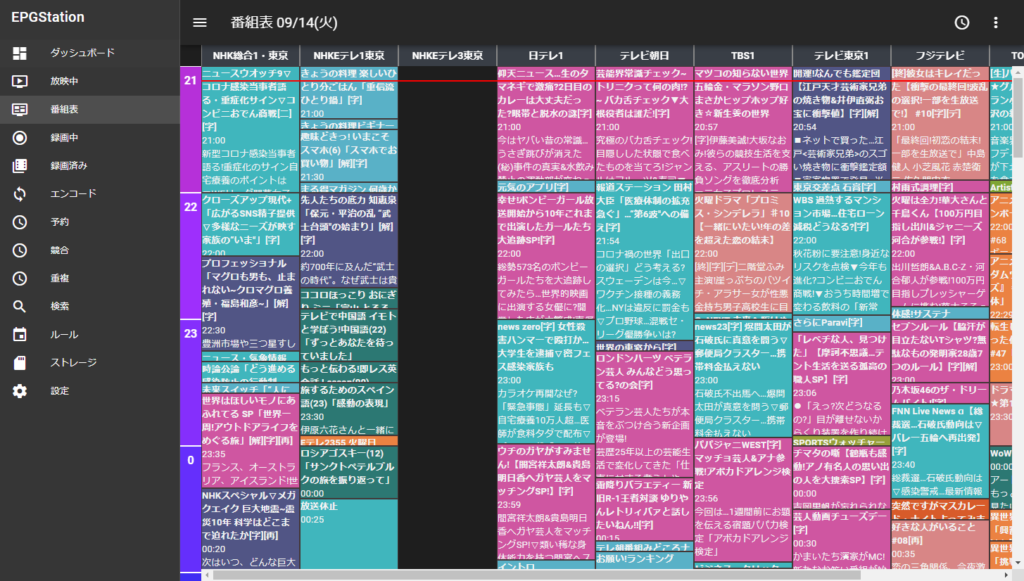
After encoding with the GPU and changing storage to an SSD, I feel like stability improved slightly.
Issues
Post-recording GPU encoding works, but many settings are still lacking, and for now I am working around them operationally. Live streaming and streaming playback still use CPU encoding, and HLS streaming is encoded with h264_v4l2m2m, but the aspect ratio becomes strange.
Update 2022/01/08: In the Web UI settings, if "Recording" -> "Prefer web playback" is turned ON, recordings play in the browser and can be watched comfortably regardless of environment. You have to turn "Prefer web playback" ON for each client, but I wonder if there is a setting somewhere to make it ON by default.