This feels a little late, but I tried using a mineo SIM in a Speed Wi-Fi NEXT W06.
Background
Recently, I have liked mineo's 1GB data plan (880 yen/month) + Packet Unlimited Plus (385 yen/month).
If you are fine with a maximum speed of 1.5 Mbps, you can get an unlimited-data environment for about 1,300 yen per month. (If you are thinking about joining mineo, you can sign up at a discount through the referral link below.)
If this could also be used with a mobile router, it would be handy for using Wi-Fi casually when traveling with family, so I tried whether a mineo SIM could be used in a Speed Wi-Fi NEXT W06.
*This was amateur work, so follow it at your own risk if you use it as a reference.
Test Environment
- Speed Wi-Fi NEXT W06
- mineo data SIM (D plan, A plan)
The Speed Wi-Fi NEXT W06 can be bought on Amazon or Mercari for a few thousand yen. I tried it with the D plan (docomo) and A plan (au). I did not have an S plan (SoftBank) SIM on hand, so I did not test that.
To state the conclusion first, both the D plan (docomo) and A plan (au) worked once the APN was configured.
Configuration
There is nothing particularly difficult, so here is just the procedure.
- Insert the SIM into the W06 and restart it.
- Connect to the W06 Wi-Fi from your smartphone.
- Open 192.168.100.1 in your smartphone browser.
- Log in to the admin screen with username: admin and password: the last 5 digits of the IMEI number.
- The IMEI number is printed on the back of the W06.
- You can also check it from the device information screen on the W06.
- Open Profile Settings on the Settings tab and press the New button.
- Set the following information and save it. *For accurate information, check the mineo support page.
- For a docomo SIM
- Profile name: mineo d
- APN (connection information): mineo-d.jp
- Username: mineo@k-opti.com
- Password: mineo
- Authentication type: CHAP
- IP type: IPv4
- For an au SIM
- Profile name: mineo au
- APN (connection information): mineo.jp
- Username: mineo@k-opti.com
- Password: mineo
- Authentication type: CHAP
- IP type: IPv4
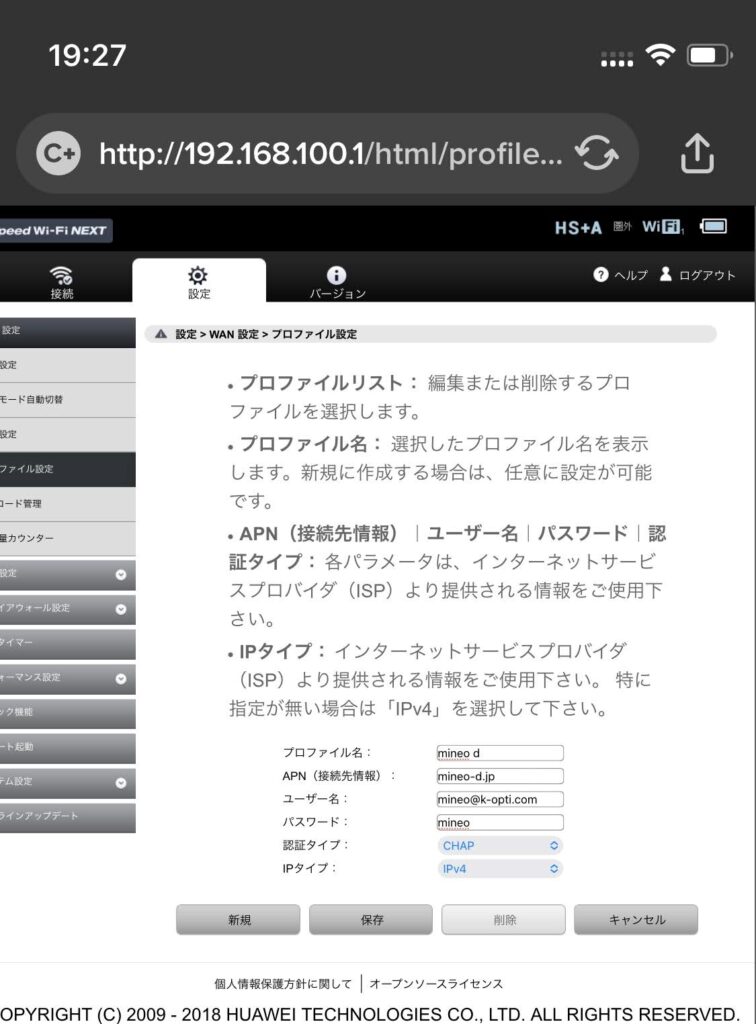
- After saving and waiting a little while, the profile becomes active and you can connect to the internet.
- If it does not connect, operate the W06 itself, go to Network Settings -> "Communication Mode", and switch to "High Speed Plus Area".
- When it connects to the docomo/au network, the W06 antenna display changes from spinning to connected.
- You can now use it as a cheap, unlimited-capacity Wi-Fi router.
- *It looks like speed restrictions apply if you use more than 10GB in 3 days.
- *The displayed capacity is 7GB by default, but the display can be changed in the settings.

For users who do not need large amounts of data transfer, I currently think mineo + Packet Unlimited Plus is the best option. With Rakuten Mobile ending its 0-yen plan, mineo is a top candidate for switching.
If you apply through the referral URL, the administrative fee (3,300 yen) is waived, which is nice.